The 10moons graphic tablet is a viable option for beginners, hobbyists, and students seeking an affordable entry into digital art, with popular models like the G10 offering 8192 levels of pressure sensitivity and a 10×6 inch active area for under $50. While it provides excellent value for its price point, professionals may find more established brands like Wacom or Huion offer superior driver stability and build quality. This review will detail its features, target audience, and comparison to competitors.
This comprehensive review will break down everything you need to know. We’ll explore what a 10moons tablet is, who it’s best for, its key features, and how it stacks up against the competition. By the end, you’ll be able to decide if this is the right tool to kickstart your creative journey.
What Exactly is a 10moons Graphic Tablet?
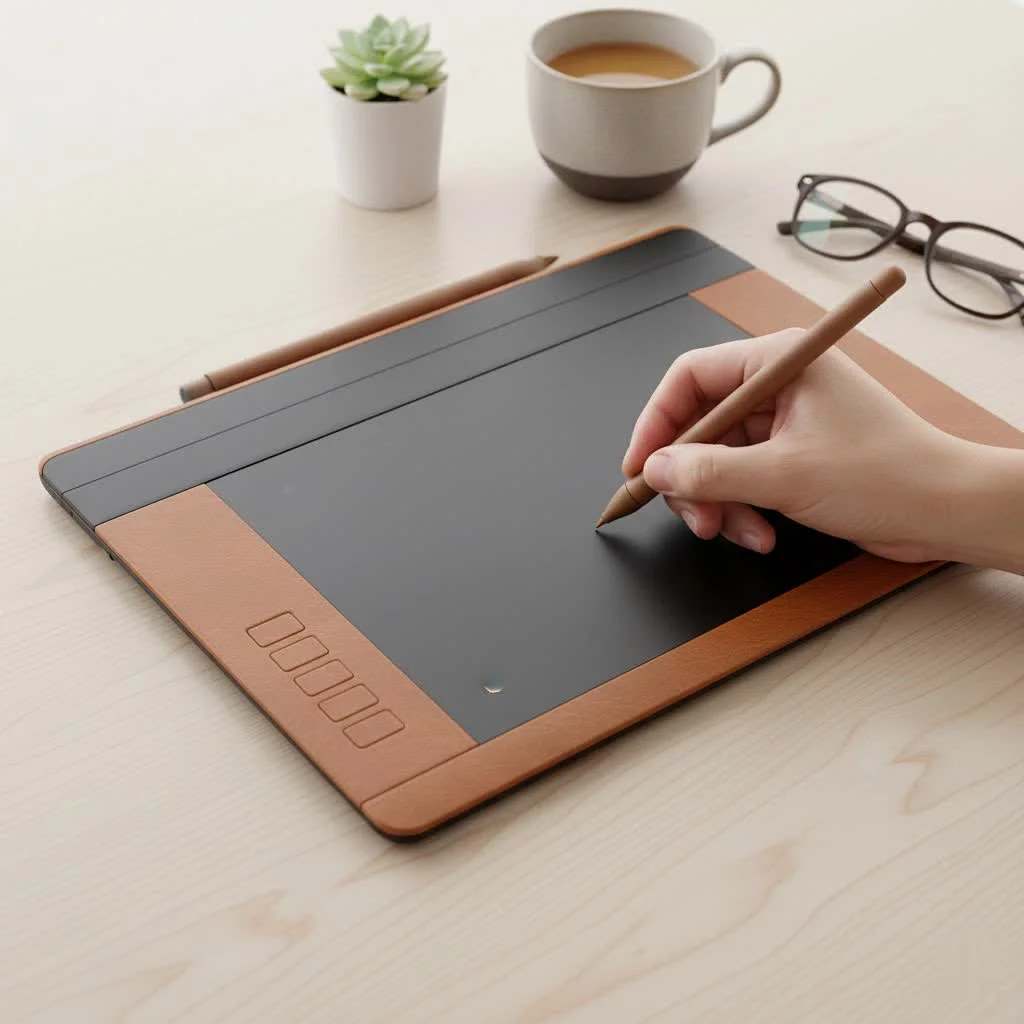
A 10moons graphic tablet is a digital drawing device that connects to your computer, allowing you to draw or write naturally with a stylus, just like you would with a pen on paper. It’s a screenless tablet, meaning you draw on the tablet’s surface while looking at your computer monitor. The brand has gained significant popularity for offering feature-rich tablets at a remarkably low price point, often under $50.
A Look at the Brand Behind the Tablet
10moons is one of several brands that have emerged to challenge the market dominance of companies like Wacom. They focus on producing cost-effective yet functional hardware. While not as well-known, they aim to provide the core functionalities—pressure sensitivity, customizable buttons, and a decent drawing area—that artists need to create digital work effectively. Their products are particularly popular on online marketplaces like Amazon and AliExpress.
Who is the 10moons Graphic Tablet For?
Understanding the target audience is crucial when evaluating a product. In my experience teaching digital art, I’ve found that not every artist needs a top-of-the-line, expensive tablet. Here’s who stands to benefit most from a 10moons device.
Perfect for Beginners and Hobbyists
If you are new to digital art and hesitant to invest hundreds of dollars, a 10moons graphic tablet is an excellent starting point. It allows you to learn the fundamentals of digital drawing, illustration, and photo editing without a significant financial commitment. The learning curve is gentle, and the experience is far more intuitive than trying to draw with a mouse.
A Viable Option for Students?
Students in design, art, or even online learning can find great utility in a 10moons tablet. It’s a powerful tool for digital note-taking, annotating documents, and participating in online whiteboard sessions. Its affordability makes it an accessible piece of tech for a student’s budget.
Deep Dive: Reviewing Popular 10moons Models
While 10moons offers several models, a couple stand out for their popularity and user feedbackLet’s take a closer look.
The 10moons T503: The Ultra-Budget Choice
|
Our Picks for the Best Graphic Tablet in 2026
As an Amazon Associate I earn from qualifying purchases.
|
||
| Num | Product | Action |
|---|---|---|
| 1 | HUION Inspiroy H640P Drawing Tablet, 6x4 inch Digital Art with Battery-Free Stylus, 8192 Pen Pressure, 6 Hot Keys, Graphics Tablet for Drawing, Writing, Design, Teaching, Work with Mac, PC & Mobile |

|
| 2 | Wacom Intuos Pro Medium Bluetooth Professional Graphic Drawing Tablet with Pro Pen 3, Compatible with Mac, Windows - 2025 Edition |
|
| 3 | HUION Kamvas 13 (Gen 3) Drawing Tablet with Screen,13.3\" Full-Laminated Art Tablet with Anti-Sparkle Canvas Glass 2.0, 99% sRGB, PenTech 4.0, 16384 Pen Pressure, Dual Dial for PC, Mac, Android, Black |
|
| 4 | HUION Inspiroy H1060P Graphics Drawing Tablet with 8192 Pressure Sensitivity Battery-Free Stylus and 12 Customized Hot Keys, 10 x 6.25 inches Digital Art Tablet for Mac, Windows PC and Android |
|
| 5 | Drawing Tablet for Beginner Graphics OSU Tablet with Battery-Free Stylus 8192 Pressure Sensitive for Digital Art, Painting & Design, Compatible with Windows, Mac OS and Android |
|
| 6 | Graphics Drawing Tablet, UGEE M708 10 x 6 inch Large Drawing Tablet with 8 Hot Keys, Passive Stylus of 16384 Levels Pressure, UGEE M708 Graphics Tablet for Paint, Design, Art Creation Sketch |
|
| 7 | HUION Drawing Tablet HS610 Graphic Tablet with Battery-Free Stylus 8192 Pen Pressure Tilt Function, 10x6.25 Inches Digital Art for Animation & Design, Compatible with Windows/Mac/Android |
|
| 8 | GAOMON M10K Drawing Tablet, 10x6 inch Large Graphics Tablet with Touch Ring, 8192 Levels Battery-Free Stylus, 10 Hot Keys, Art Tablet for Design, Writing, Editing, Work with Mac, Windows, Android |
|
| 9 | HUION KAMVAS Pro 16 Drawing Tablet with Screen, 15.6 inch Pen Display Anti-Glare Glass 6 Shortcut Keys Adjustable Stand, Graphics Tablet for Drawing, Writing, Design, Work with Windows, Mac and Linux |
|
| 10 | XOPPOX Graphics Drawing Tablet 10 x 6 Inch Large Active Area with 8192 Levels Battery-Free Pen and 12 Hot Keys, Compatible with PC/Mac/Android OS for Painting, Design & Online Teaching Black |
|
The T503 is often the first model people encounter. It’s incredibly cheap, often found for around $25-$30. It provides a small, portable active area and basic features. While it gets the job done for simple tasks like writing or basic line art, its limited size and features make it less suitable for serious illustration.
The 10moons G10: The People’s Choice
The G10 is arguably the brand’s most popular tablet. For a price typically under $50, it offers a generous 10×6 inch active drawing area, 8192 levels of pressure sensitivity, and a battery-free pen. These are specs that, just a few years ago, were reserved for much more expensive tablets. It also includes several programmable express keys, which are fantastic for speeding up your workflow by mapping them to shortcuts like undo, zoom, or brush size changes.
Key Features of 10moons Tablets
When evaluating a graphic tablet, we need to look beyond the price. Here are the core features of most 10moons models and what they mean for you as an artist.
- Pressure Sensitivity: Most 10moons tablets boast 8192 levels of pressure sensitivity. In theory, this allows for nuanced control over line weight and opacity—press harder for thicker, darker lines and lighter for thinner, fainter ones. However, some user reviews suggest the pressure curve can be tricky to master and may require more force than premium tablets.
- Active Area: This is the physical surface on the tablet where your pen input is detected. Models like the G10 offer a 10×6 inch area, which is ample space for broad, sweeping strokes and comfortable drawing without feeling cramped.
- Express Keys: These are physical, customizable buttons on the side of the tablet. They are a massive time-saver, allowing you to keep your non-drawing hand on the tablet to access shortcuts instead of constantly reaching for your keyboard.
- Pen Technology: 10moons pens are typically battery-free, utilizing EMR (Electro-Magnetic Resonance) technology. This is a huge plus, as you never have to worry about charging your pen or replacing batteries in the middle of a creative session.
“For an entry-level artist, the most important thing is to start creating. A tablet like the 10moons G10 removes the financial barrier to entry, providing solid, workable features that are more than enough to learn the ropes of digital art.” – David Chen, Digital Art Instructor
How Does 10moons Compare to Wacom and Huion?
No review is complete without comparing the product to its main competitors. Wacom has long been the industry standard, and Huion is a well-regarded budget-friendly alternative.
| Feature | 10moons (G10) | Huion (Inspiroy H610 Pro V2) | Wacom (Intuos Small) |
|---|---|---|---|
| Price | ~$40 – $50 | ~$50 – $60 | ~$70 – $80 |
| Active Area | 10 x 6 inches | 10 x 6.25 inches | 6 x 3.7 inches |
| Pressure Levels | 8192 | 8192 | 4096 |
| Express Keys | 12 + 10 media keys | 8 + 16 soft keys | 4 |
| Build Quality | Basic Plastic | Sturdy Plastic | Premium Feel |
| Driver Support | Can be inconsistent | Generally reliable | Rock-solid, industry best |
As you can see, on paper, 10moons offers incredible value. However, the areas where brands like Wacom and Huion often justify their higher cost are in the driver software, build quality, and customer support. Driver stability is crucial, as it’s the software that allows your tablet to communicate with your computer. While many users have no issues with 10moons drivers, some report glitches or difficulties during setup, especially on macOS.
Setting Up Your 10moons Graphic Tablet: A Quick Guide
Getting started is usually straightforward, but following these steps can prevent common headaches:
- Do NOT plug in the tablet first. Before connecting the USB cable, you must install the driver.
- Uninstall other tablet drivers. If you have old Wacom or Huion drivers on your computer, uninstall them completely to prevent conflicts.
- Download the correct driver. Go to the official 10moons website to download the latest driver for your specific model. Avoid using the CD that might come in the box, as it’s likely outdated.
- Install and restart. Run the driver installation program and restart your computer once it’s finished.
- Connect the tablet. Now you can plug your 10moons graphic tablet into a USB port on your computer.
- Configure your settings. Open the tablet software to customize your pen pressure, map the active area, and assign shortcuts to your express keys.
Frequently Asked Questions (FAQ)
Is a 10moons graphic tablet good for professional work?
For professional, commission-based work where reliability is paramount, I would recommend investing in a more established brand like Wacom or Huion. 10moons is better suited for beginners, hobbyists, and students.
What software is compatible with 10moons tablets?
They are compatible with most major creative software on Windows and macOS, including Adobe Photoshop, Illustrator, Clip Studio Paint, Krita, GIMP, and Blender.
How do I fix the pen pressure not working?
This is the most common issue. It’s almost always a driver problem. Ensure you have uninstalled all other drivers, installed the latest 10moons driver before plugging in the tablet, and have Windows Ink enabled or disabled as required by your specific art program.
Can I use a 10moons tablet with my Android phone?
Some newer models offer Android compatibility, but you’ll need a specific USB-OTG (On-The-Go) adapter. Check the product specifications for your model to confirm this feature.
Are the express keys really useful?
Absolutely. Once you get into the habit of using them for functions like ‘Undo’, ‘Zoom In/Out’, and ‘Change Brush Size’, they dramatically speed up your workflow and make the creative process feel more fluid.
Final Verdict: Is a 10moons Tablet Worth Your Money?
After extensive review, the verdict is clear: for the right person, a 10moons graphic tablet offers unbeatable value. If you are a beginner taking your first steps into digital art, a student on a tight budget, or a hobbyist who wants to doodle digitally, it is an excellent and low-risk investment. The features you get for the price, particularly with the G10 model, are impressive.
However, be prepared for a less polished experience compared to premium brands. The build quality is functional but not luxurious, and you might need to be a little patient with the driver installation. But for its intended audience, 10moons successfully lowers the barrier to digital creativity, and that is a mission worth celebrating. Ready to start your art journey? A 10moons tablet could be your perfect first step.
Frequently Asked Questions
Is a 10moons graphic tablet good for professional work?
For professional, commission-based work where reliability is paramount, investing in an established brand like Wacom or Huion is recommended. 10moons tablets are better suited for beginners, hobbyists, and students due to their affordability and entry-level features.
What software is compatible with 10moons tablets?
10moons tablets are compatible with most major creative software on Windows and macOS. This includes popular programs such as Adobe Photoshop, Illustrator, Clip Studio Paint, Krita, GIMP, and Blender, allowing for broad artistic application.
How do I fix pen pressure not working on my 10moons tablet?
Pen pressure issues are most commonly driver-related. Ensure all other tablet drivers are uninstalled, install the latest 10moons driver before plugging in the tablet, and verify Windows Ink settings are correctly configured for your specific art program. Restarting your computer after driver installation is also crucial.
Can I use a 10moons tablet with my Android phone?
Some newer 10moons models do offer Android compatibility, but this feature requires a specific USB-OTG (On-The-Go) adapter. Always check the product specifications for your particular 10moons model to confirm Android support before purchasing.
Are the express keys on 10moons tablets useful for workflow?
Absolutely, the express keys are highly useful for speeding up your workflow. By mapping them to frequent shortcuts like 'Undo', 'Zoom In/Out', or 'Change Brush Size', artists can keep their non-drawing hand on the tablet, making the creative process more fluid and efficient.
Set Up Your 10moons Graphic Tablet
Follow these steps to correctly install and configure your 10moons graphic tablet, preventing common driver issues and ensuring smooth operation.
Before connecting the USB cable, you must install the tablet's driver. Do NOT plug in the tablet to your computer yet, as this can lead to installation conflicts.
If you have any old Wacom or Huion drivers on your computer, uninstall them completely. This prevents potential software conflicts that could interfere with your 10moons tablet's functionality.
Go to the official 10moons website to download the most current driver for your specific model. Avoid using any installation CD that came with the tablet, as it is likely outdated and may cause issues.
Run the downloaded driver installation program. Once the installation is complete, restart your computer to ensure all changes are applied correctly and the driver is fully integrated into your system.
After restarting, you can now plug your 10moons graphic tablet into a USB port on your computer. Open the tablet software to customize pen pressure, map the active area, and assign shortcuts to your express keys for personalized use.
Get our weekly buyer guide
Practical specs, not advice. Unsubscribe anytime.
I’ve been using my 10moons tablet for a few months now, mostly for concept art and character design. The value for the price is unbeatable, especially compared to some of the more expensive Huion models I considered. It’s definitely helped me improve my workflow and experiment with new techniques without feeling like I overspent.
As a student, the 10moons tablet seemed like a perfect fit for my budget. The drawing experience itself is pretty good, but I’ve had a few minor driver issues that required a restart, which can be a bit frustrating when I’m in the middle of a project. It’s not a dealbreaker, but I can see why professionals might lean towards Wacom for more stability.
I picked up the 10moons G10 after reading about its pressure sensitivity, and for under $50, it’s seriously impressive. The 8192 levels really do make a difference for my line work in Krita. It’s been a fantastic upgrade from just using a mouse for my digital sketches, and the active area is plenty big for my needs as a hobbyist.
This tablet is a game-changer for beginners! I was hesitant to invest a lot in a graphic tablet, but the 10moons G10 was exactly what I needed to get started with digital art. The 10×6 inch active area feels very natural, and it’s made learning so much more enjoyable without breaking the bank. Highly recommend for anyone just starting out.